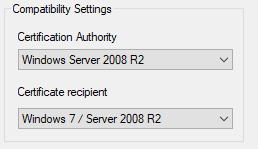
Custom certificate templates that have been duplicated and modified do not appear in the template selection drop-down list when attempting to request a certificate through the Certificate Services Web Enrollment website.
The Certificate Services Web Enrollment website does not support certificate templates with a Schema Version 3 or Version 4.
If a duplicated template is created using modern compatibility settings, Active Directory Certificate Services (AD CS) saves the template with a newer schema version, preventing it from being displayed in the Web Enrollment interface.
This issue was verified on Windows Server 2019.
Setting the compatibility level to Windows Server 2008 R2 before making other changes ensures that the template is created with Schema Version 2, which is supported by the Web Enrollment website.
You may choose to create two separate templates if you need a higher schema version for other certificate requests. One template can be used for standard certificate enrollment, while a second template with Schema Version 2 can be dedicated to Certificate Services Web Enrollment requests.
Date Created: Wednesday, 23 October 2019, 10:18 PM